
Visit Japan Web Guide 2026: How to Register Before Entering Japan

Learn how to use Visit Japan Web to quickly fill out your Japan arrival card and customs declaration online before landing in Japan.

Written by
This is the official account of MATCHA's editorial department. Our articles feature useful travel information for visitors to Japan, from how-to guides to recommended places to visit.
This service includes sponsored advertisements.
Fill in Your Japan Arrival Card Online with Visit Japan Web
To enter Japan, all foreign travelers must complete the mandatory Japan Arrival Card—which consists of the Disembarkation Card for Foreigners and the Customs Declaration Form.
You can fill out both forms online using Visit Japan Web, an official service operated by the Japanese government.
Tips for Completion
- Required Document: You only need your passport to complete the forms.
- Timing: Complete the forms through Visit Japan Web at least 6 hours before landing to ensure a smooth entry.
Completing your Japan Arrival Card through Visit Japan Web generates a QR code to present at airport immigration, eliminating the need for the paper version handed out on the plane.
-
Table of Contents
- What Is the Official Visit Japan Web Website?
- Is There a Visit Japan Web App for iPhone or Android?
- 2. How to Fill in the Visit Japan Web Form
- Japan Arrival Card: Paper Form vs. Visit Japan Web
- 4. FAQ About Entering Japan with Visit Japan Web
- Other Japan Travel Tips: Discount Coupons, Tickets, Hotel Booking
What Is the Official Visit Japan Web Website?
Visit Japan Web (VJW) is an official online platform that combines the Disembarkation Card for Foreigners and the Customs Declaration Form into a single electronic system.
Travelers on a short-term stay (90 days or less) for purposes like tourism or visiting relatives can register their details before travel.
While paper forms are still accepted, using the online platform is strongly recommended: it offers multi-language support (beyond the paper form's limited Japanese, English, and Chinese options) and allows you to present a simple QR code at airport immigration for faster, smoother clearance.
Is There a Visit Japan Web App for iPhone or Android?
No, there is no official Visit Japan Web mobile app available on the App Store or Google Play; the service operates strictly through your web browser.
Because the platform requires an internet connection, failing to connect to Wi-Fi or mobile data upon arrival can prevent your QR codes from loading and delay your customs clearance.
To avoid this, set up the Visit Japan Web Offline Service on your phone in advance. Installing this web shortcut ensures you can access and display your QR codes even without an internet connection. Alternatively, you can simply take a screenshot of your QR code before landing.
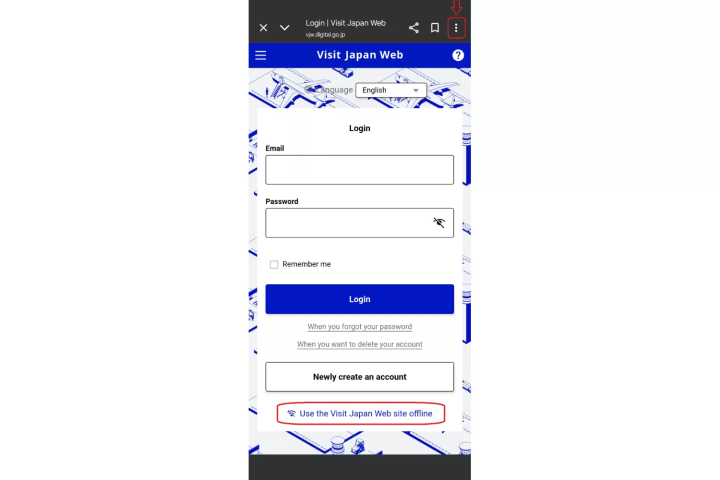
Setting up the VJW Offline Service is simple. Open the Visit Japan Web website on your phone, then follow the steps below based on your mobile operating system:
This way, even if the internet is unstable at the airport or during your journey, you can present your QR Code and relevant information at any time, making the entry process faster and smoother.
2. How to Fill in the Visit Japan Web Form
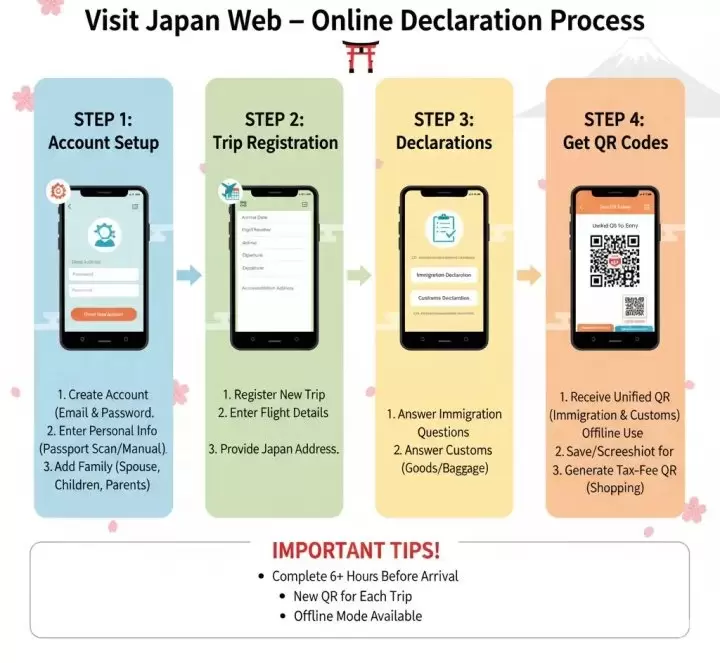
Step 1: Register an Account
First of all, you must register a personal account before logging in your entry data.
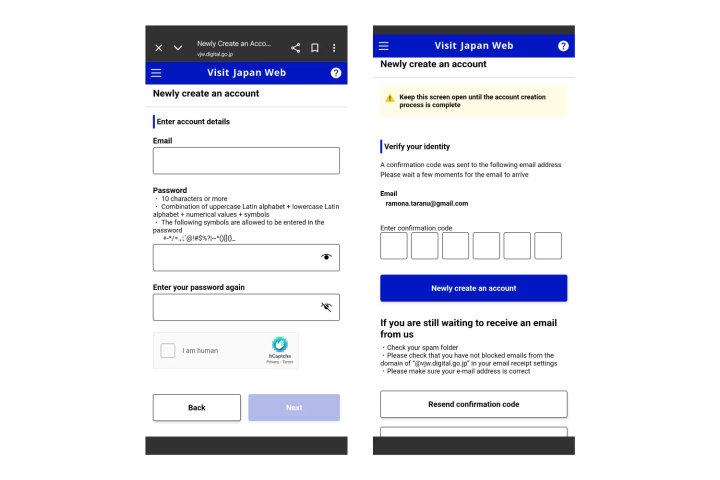
You can access the Visit Japan Web website or App via a mobile phone, computer, or other device, select "Create new account" on the main page, then click "Agree to the Terms of Use and Privacy Policy," enter your account details, and complete the email verification.
*The email address for account registration must not exceed 128 characters. The password must be 10 characters or more (including uppercase and lowercase English letters, numbers, and symbols).
Step 2: Register Personal Information and Accompanying Family Members
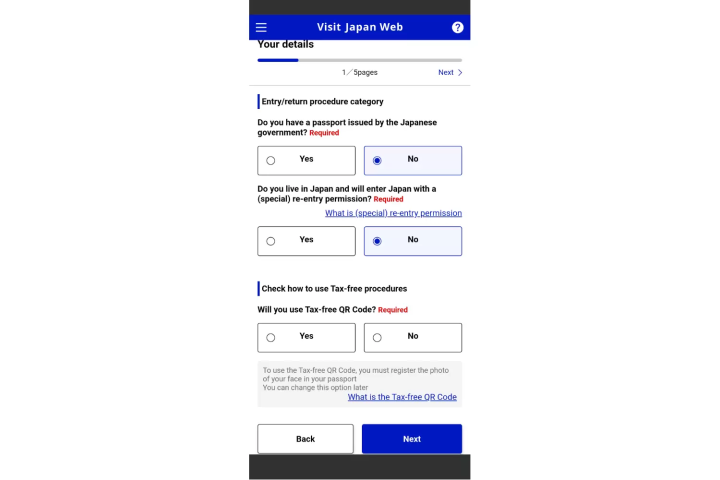
(1) After registering your account, return to the login page to begin registering your personal information and that of any accompanying family members.
The system will first ask questions related to "Entry/return procedure category." If you are not a Japanese national, you should select "No" for both questions.
(2) As for the final question, "Confirm use of tax-free procedure," select "Yes" if you wish to present the tax-free QR Code when shopping in Japan.
(3) Next, you can choose to manually enter or scan (i.e., "Read with camera") your passport information.
While choosing to scan is convenient, the content might be inaccurate due to unclear image quality. If this happens, please either rescan or manually correct the data that the system automatically enters into the fields after reading.
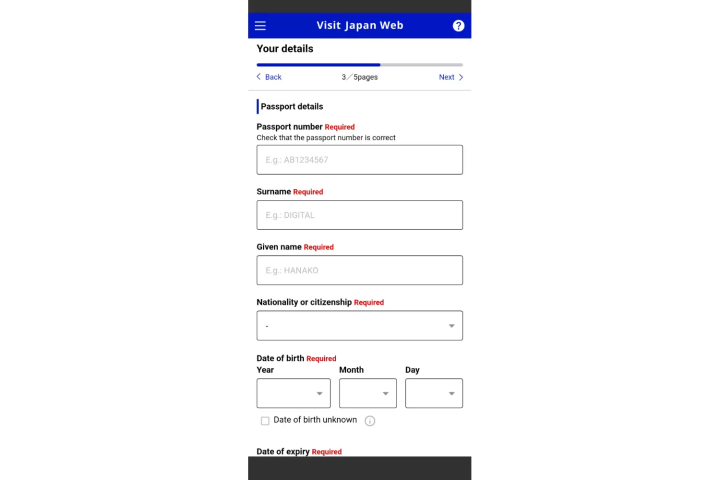
(4) The "Personal Data" section beneath the "Passport Information" block will ask for your occupation, your current address (country and city name), and your address in Japan (where you will be staying). You will need to manually enter this information.
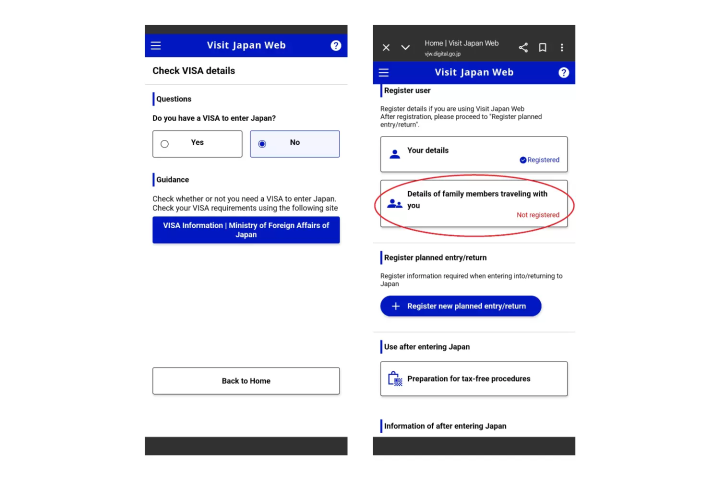
(5) After completing the registration of your personal information, the system will switch the screen to "Confirm VISA Information." For short-term travel, please select "No."
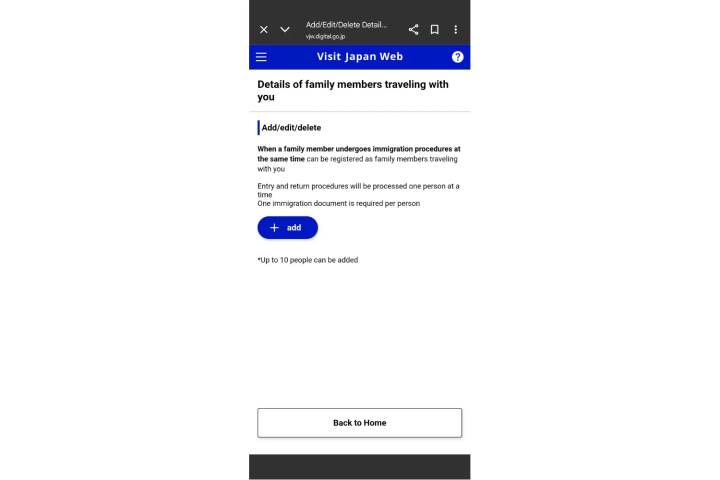
Afterward, return to the home page to fill in the data about "Accompanying Family Members." The required information for accompanying family members is the same as for personal data. If a travel agency has already registered the data for your family members, you can directly select "Use data entered by proxy."
Step 3: Register Entry and Return Schedule Information
(1) Return to the homepage, select "Register new entry and return schedule," and enter information such as the scheduled date of arrival in Japan, the entry/return schedule, the trip name (purpose of travel), the airline name, flight number, and departure location.
(2) If you registered accompanying family members in the previous step, after completing your personal entry and return schedule information, please click "Select accompanying family members."
Step 4: Complete Immigration and Customs Declarations
(1) By Step 4, most of the information should already be filled out. To fill in the "Immigration and Customs Declarations," click "Return to entry/return procedure" and go to the home screen.
(2) After entering the "Immigration and Customs Declarations" section, the screen will display the basic personal information and the address in Japan (accommodation) that you previously filled out in the "Register Personal Information" and "Register Entry and Return Schedule" steps.
Please click "Next" and answer the relevant questions for the "Disembarkation Card for Foreigners" and the "Declaration of Accompanied and Unaccompanied Goods."
*For accompanied and unaccompanied goods, only personally purchased items should be entered. If the total overseas market value of the items is less than 10,000 JPY, you do not need to enter them.
Step 5: Present the Japan Entry QR Code and Tax-Free QR Code
Once you confirm that the information for the immigration and customs declarations is correct, check the box for "The contents entered above are true and correct" and click "Register."
You will then be able to find the entry QR Code on the "Japan entry/return procedure" page.
If you need to present the tax-free QR Code, please return to the Visit Japan Web system homepage and select "Preparation for tax-free procedure" to "Create tax-free QR Code."
The above covers the simple steps for operating Visit Japan Web. If you have any questions about how to answer a specific item, you can consult the official Visit Japan Web Instruction Manual provided by the Japanese government.
Japan Arrival Card: Paper Form vs. Visit Japan Web
The Japan Disembarkation Card for Foreigners (often called the Arrival Card) is an official entry document required by Japanese Immigration for all foreign nationals entering the country.
It collects basic identification, flight details, purpose of stay, and security background questions.
Key Information Required on the Japan Arrival Card
- Personal Data: Full name, date of birth, nationality, gender, and passport number.
- Travel Details: Flight number/vessel name, purpose of visit (e.g., tourism, business), and length of stay.
- Accommodation: Name and address of your hotel or residence in Japan, plus a local phone number.
- Declarations: Simple yes/no questions regarding criminal history or past deportation from Japan.

The Japan Arrival Card can be completed in two ways:
- Digital (Recommended): Register online via Visit Japan Web before your trip. This generates a unified QR code that covers both Immigration (Disembarkation) and Customs declaration, allowing you to scan through automated kiosks at major Japanese airports.
- Paper: Fill out the physical slip handed out by flight attendants during your flight or available at tables near airport immigration.
While major Japanese airports support Visit Japan Web, smaller or regional airports may not have the necessary scanners. If you land at an airport without this system, you must complete the traditional paper version of the Japan Arrival Card upon arrival.
International Airports That Support Digital Immigration Procedures
Nearly all major international airports in Japan accept Visit Japan Web QR codes for immigration and customs clearance.
Below are the 7 main international gateways that support digital entry:
- Narita International Airport (NRT - Tokyo area)
- Tokyo International Airport (HND - Haneda Airport)
- Kansai International Airport (KIX - Osaka/Kyoto area)
- Chubu Centrair International Airport (NGO - Nagoya)
- Fukuoka Airport (FUK - Kyushu)
- New Chitose Airport (CTS - Hokkaido)
- Naha Airport (OKA - Okinawa)
4. FAQ About Entering Japan with Visit Japan Web
Q1: Is Visit Japan Web mandatory in 2026?
Completing the Japan Arrival Card is mandatory for all foreign travelers. However, using Visit Japan Web is optional.
Visit Japan Web is simply the official digital version of the entry forms. You can choose to pre-register online to get a QR code for faster clearance, or complete the traditional paper card upon arrival, though the paper option takes longer to process.
Q2: What is the official Visit Japan Web URL?
The official Visit Japan Web URL is: https://services.digital.go.jp/en/visit-japan-web/
Q3: Does Visit Japan Web have an app?
No, there is no official app for Visit Japan Web on the App Store or Google Play. This platform operates strictly as a web-based service accessible through your phone or computer browser.
However, Visit Japan Web can be used like an app - in Offline Mode.
Q4: Can I complete Visit Japan Web at the airport?
Yes, the Visit Japan Web forms can be completed at the airport. However, we recommend you fill in the online forms before landing to save time.
Officially, it is advised to complete the forms through Visit Japan Web at least 6 hours before landing to ensure a smooth entry.
Q5: Do I need Visit Japan Web if I have a visa?
Yes, all foreign individuals entering Japan need to complete the Arrival Card, either digitally through Visit Japan Web, or in paper format.
Q6: Does every family member need their own Visit Japan Web account?
All adult members of the family should register on Visit Japan Web. Children should be registered as "accompanying family" of one of the adults.
Q7: What should I enter for my address in Japan?
In the field requiring your address in Japan, write the name of the first hotel you're staying at.
Q8: What happens if my flight or hotel changes?
The data you register on Visit Japan Web can be edited at any time if your plans change last-minute. Once you save your updates, the system will generate a revised QR code for you to present at airport immigration.
Q9: Do I need a new QR code for every trip to Japan?
Yes, you need a new QR code for every trip to Japan.
QR codes generated on Visit Japan Web are tied to specific trip details—such as your flight number, date of arrival, and accommodation address—and expire once you pass through customs and immigration. You cannot reuse a QR code from a past entry.
However, because your profile and passport details remain saved in your Visit Japan Web account, setting up a new trip takes only a few minutes. You simply log in, select "Register New Trip," enter your updated flight and hotel info, and generate your new QR code.
Q10: Can I screenshot the Visit Japan Web QR code?
Yes, you can take a screenshot of the Visit Japan Web QR code if you've completed your registration beforehand.
Q11: How long before entry should I apply for Visit Japan Web?
According to official Japanese guidance, air travelers should register and enter their details on Visit Japan Web at least 6 hours before landing.
This allows the system sufficient time to process your entry information and ensures you have a buffer to modify any details if your schedule changes before arrival.
Q12: What is the definition of accompanying family members for Visit Japan Web? How many can be included?
The "Accompanying Family Members" feature on Visit Japan Web is restricted to immediate family: spouses, direct ancestors (parents/grandparents), direct descendants (children/grandchildren), and legal equivalents. Friends and distant relatives cannot be registered under this category.
You can register up to 10 eligible family members on a single account, provided you enter and leave Japan together.
For the smoothest clearance, every adult and capable traveler should complete their own application on a separate account. The accompanying family feature is intended primarily for infants, young children, or individuals genuinely unable to complete the forms themselves.
Q13: Can Visit Japan Web be used offline?
Yes, Visit Japan Web supports offline functionality. To set it up, open the Visit Japan Web login page and select "Use the Visit Japan Web site offline" to view the official setup guide.
The system will walk you through saving the offline service icon directly to your device's home screen so you can display your QR code without an active internet connection.
Other Japan Travel Tips: Discount Coupons, Tickets, Hotel Booking
MATCHA is a travel media platform created for international visitors to Japan, offering comprehensive guides on tourist spots, food, and itineraries.
Our content, curated by an international team passionate about Japan, is published in 10 languages and attracts over 3.4 million monthly readers. We provide the most detailed travel guides alongside essential, timely information sourced from the Japanese government and corporate agencies.
At MATCHA, you can also book:
- Hotels in Japan
- Attraction Tickets
- Tours and Experiences
- Wi-Fi / SIM Card / eSIM
We also provide:
- Special Offers for Train Tickets and Chartered Cars
- Exclusive Coupons for Japanese Stores and Car Rentals
Read also


Main image by Pixta
This is the official account of MATCHA's editorial department. Our articles feature useful travel information for visitors to Japan, from how-to guides to recommended places to visit.
Top Articles
There are no articles in this section.
Special Features
More